MageMe EU Withdrawal | Configuration Reference
Complete reference for every admin setting in Stores → Configuration → MageMe Extensions → EU Withdrawal.
The page is structured to mirror the admin form — the sections are laid out in lifecycle order: General module setup → which markets the flow is offered in → what the customer sees pre-contract → what's eligible at all → when the clock runs → special digital waiver path → storefront UI → customer emails.
For conceptual deep dives see Eligibility Rules, Digital Content Waiver, Email Templates, and Annex I Translations.
On this page
- General — master enable, request number prefix, contract type, URL prefix
- Scope & Applicability — limit the self-service flow to chosen countries and customer groups (sits just after General in the admin)
- Pre-Contract Information — Art. 6(1)(h) disclosure
- Eligibility Rules — Article 16 exclusion presets + Detection subgroup
- Withdrawal Window — when the clock starts and how long it runs
- Digital Waiver — checkout step, confirmation email, per-locale texts
- Frontend — item selection, bundle item selection, button labels, placements, return reasons, review step, refund summary tax display
- Admin Notifications — internal team alerts: new-request alert + reimbursement-overdue digest
- Customer Notifications — 6 emails + shared branding
- Data retention — how long records are kept (no module settings)
- reCAPTCHA — pointer
1. General
Master switches that take effect across the entire module.
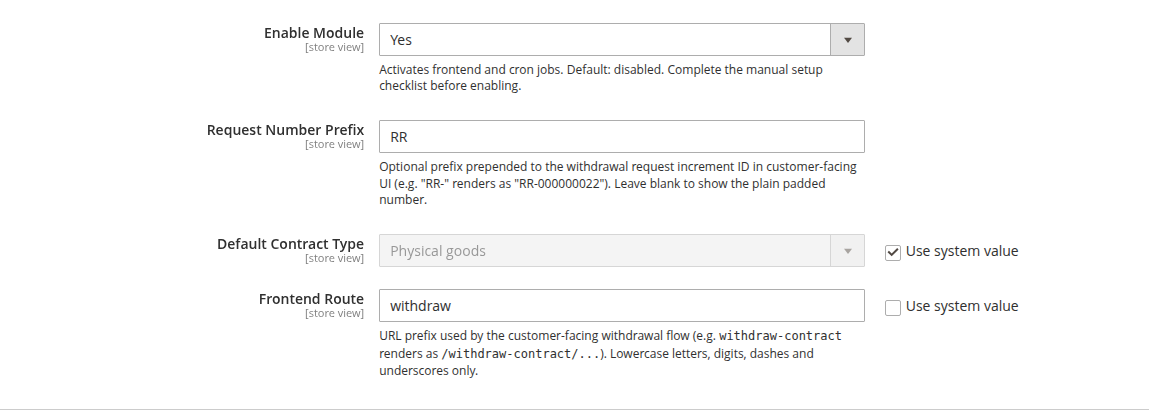
| Field | Type | Default | Description |
|---|---|---|---|
| Enable Module | Yes/No | No | Activates the frontend flow and cron jobs. Complete the manual setup checklist (see Setup Checklist) before enabling. |
| Request Number Prefix | Text | (blank) | Optional prefix prepended to the withdrawal request ID in customer-facing UI. For example, RR- renders the request ID as RR-000000022. Leave blank to show the plain padded number. |
| Default Contract Type | Select | Physical goods | Default contract classification used when the module needs to pick a fallback. Options: Physical goods, Digital content (non-tangible), Digital service (SaaS / subscription), Financial services (not supported). |
| Frontend Route | Text | withdraw-contract | URL prefix for the customer-facing withdrawal flow. withdraw-contract renders the landing page at /withdraw-contract/. Lowercase letters, digits, dashes, and underscores only. Changing the value after the module is live invalidates any URLs printed in already-sent emails. |
Scope & Applicability
Controls which markets and customer groups the self-service withdrawal flow is offered in. In the admin this group sits directly under General. These are business decisions about where and to whom you show the storefront flow — not legal exclusions: an EU consumer's statutory right of withdrawal does not depend on them, and a withdrawal received by other means (email, letter) must still be honoured manually.
| Field | Type | Default | Description |
|---|---|---|---|
| Restrict by Country | Yes/No | No | When on, the self-service flow is offered only for orders whose billing or shipping address is in one of the selected countries. Off means it is available to everyone. |
| Offer Withdrawal For Countries | Multi-select | EU-27 + EEA (Norway, Iceland, Liechtenstein) | The countries the flow is offered for when the restriction is on. Add the United Kingdom manually if you sell to UK consumers (a separate national regime with a comparable 14-day right). Clearing the list switches the restriction off — the flow stays available to everyone. |
| Restrict by Customer Group | Yes/No | No | When on, the self-service flow is hidden for orders placed by the selected customer groups. Use this to keep withdrawal off for your B2B / wholesale customers — the right of withdrawal is a consumer right. Off means it is available to every group. |
| Exclude Customer Groups | Multi-select | (none) | The customer groups that are not offered the flow when the restriction is on. Pick your business groups here. Guests always count as consumers and cannot be excluded. Clearing the list switches the restriction off — the flow stays available to every group. |
This restricts the storefront flow only. It does not take away anyone's statutory right of withdrawal: a consumer you've scoped out — whether by country or by customer group — who is legally entitled can still withdraw by contacting you, and you must honour that manually.
2. Pre-Contract Information (Art. 6(1)(h))
Mandatory pre-contractual disclosure of the right of withdrawal, displayed on the checkout payment step. Every display is logged forensically (Art. 10 defence).
| Field | Type | Default | Description |
|---|---|---|---|
| Enable Pre-Contract Disclosure | Yes/No | Yes | Master kill-switch. When disabled, the block does not render and no display events are recorded. Disabling exposes the merchant to Art. 10 — the right of withdrawal extends by up to 12 months plus the standard 14-day period if pre-contract information was not disclosed. |
| Return Address | Textarea | (blank, falls back to Stores → Configuration → General → General → Store Information → Store Contact Address) | Where consumers send goods back. If blank, the Magento store contact address is used. |
| Display In Checkout | Yes/No | Yes | Off renders no on-page block but still records display events server-side via a predispatch fallback. Use only for sandbox testing — production must display the block. |
The actual period length (14, 30, 100 days) is set in Withdrawal Window, not here.
The Annex I text rendered on this page (covering all 22 EU locales) is based on the EUR-Lex Directive text. Counsel review is recommended before overriding the text per locale — see Annex I Translations.
3. Eligibility Rules (Art. 16 Presets)
Per-category exclusions from the right of withdrawal. All four presets are off by default; the merchant opts items out by enabling the relevant preset and tagging the products. Detailed mechanics, seal-break semantics, and product-attribute setup in Eligibility Rules.
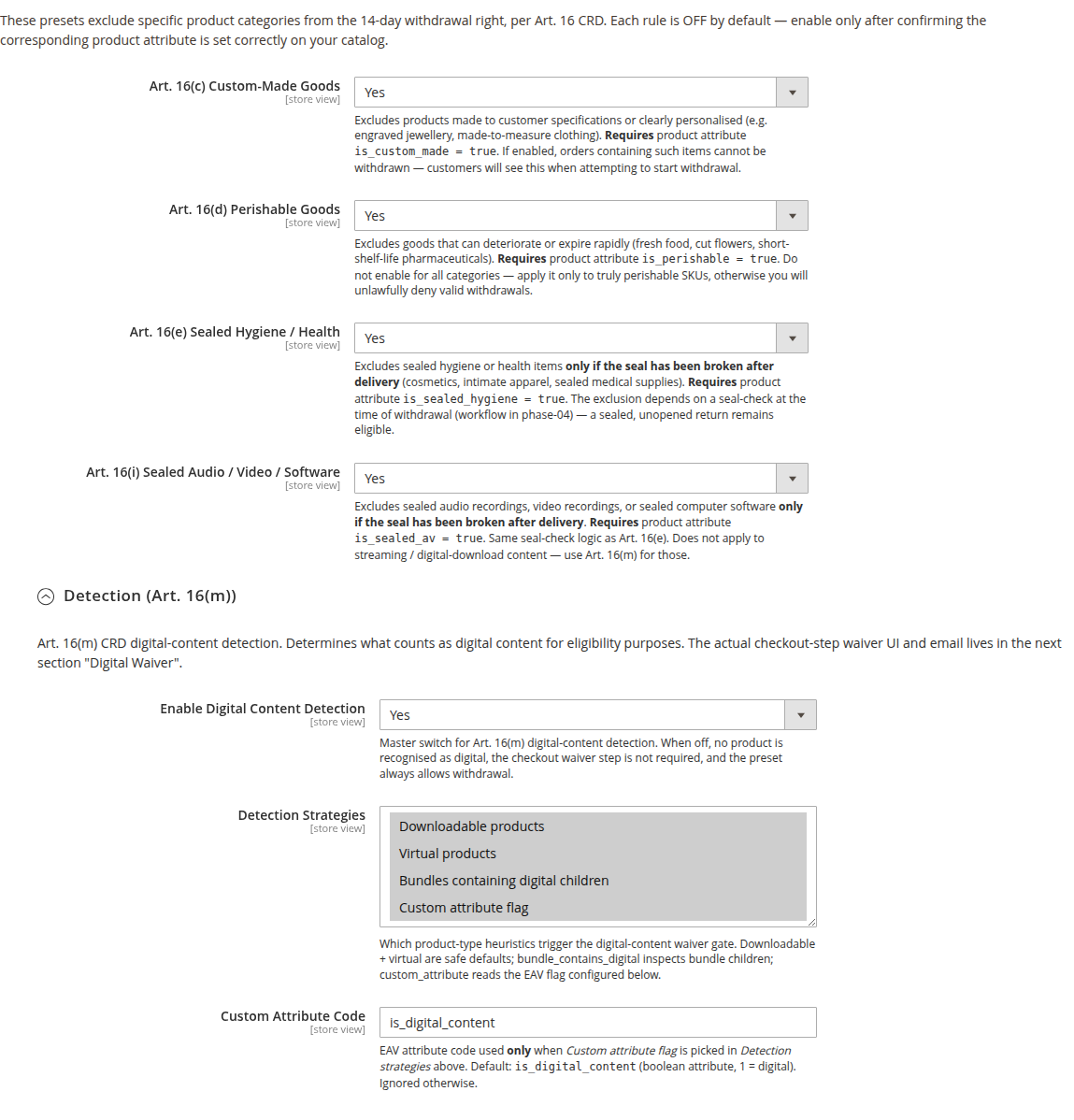
| Field | Type | Default | Required attribute | Description |
|---|---|---|---|---|
| Art. 16(c) Custom-Made Goods | Yes/No | No | is_custom_made = 1 | Excludes products made to consumer specifications. |
| Art. 16(d) Perishable Goods | Yes/No | No | is_perishable = 1 | Excludes goods that deteriorate or expire rapidly. |
| Art. 16(e) Sealed Hygiene / Health | Yes/No | No | is_sealed_hygiene = 1 | Excludes sealed hygiene or health items only if the seal has been broken after delivery. |
| Art. 16(i) Sealed Audio / Video / Software | Yes/No | No | is_sealed_av = 1 | Excludes sealed audio/video/software only if the seal has been broken after delivery. |
Detection (Art. 16(m)) — nested subgroup
Decides what counts as digital content for eligibility purposes. The actual checkout-step waiver UI and email lives in the next section, Digital Waiver.
| Field | Type | Default | Description |
|---|---|---|---|
| Enable Digital Content Detection | Yes/No | No | Master switch. When off, no product is recognised as digital, no waiver step is required, and the Art. 16(m) preset always allows withdrawal. |
| Detection Strategies | Multi-select | Downloadable, Virtual | Heuristics: Downloadable products, Virtual products, Bundles containing digital children, Custom attribute flag. |
| Custom Attribute Code | Text | is_digital_content | EAV attribute code, read only when Custom attribute flag is in the strategies list. |
4. Withdrawal Window
Defines when the 14-day withdrawal right starts running (Art. 9(2)(b)) and how long it lasts (Art. 9(2)). Together these control the period each order's withdrawal is open.
| Field | Type | Default | Range | Description |
|---|---|---|---|---|
| Withdrawal Period (Days) | Number | 14 | 14–3650 | Period length per Art. 9(2). Extension allowed (30, 100 days, etc.) and common as a customer-trust feature. Reduction below 14 is illegal and the field rejects values outside this range. |
| Delivery Confirmation Statuses | Multi-select | (none) | — | One or more Magento order statuses whose transition marks the moment the customer received the goods. The clock starts at the earliest transition into any of the selected statuses. Multi-select supports merchants with several delivered-type statuses (complete, delivered, delivered_partial). |
| If Delivery Is Never Confirmed | Select | Treat as not eligible | — | What happens to an order that is already in a Delivery Confirmation Status but has no recorded transition into it (so there is no delivery date to start the clock — common for orders set by an import or an external system). Treat as not eligible (default) keeps such an order out of the self-service flow; Keep withdrawal open leaves it open with no deadline. Orders that are genuinely not yet delivered (a non-delivery status such as processing) always stay open regardless of this setting. |
| Statuses Excluded From Withdrawal | Multi-select | (none) | — | Orders whose current status is selected here are never offered for withdrawal — useful for legacy or migration statuses (e.g. imported) that should stay out of the self-service flow. Do not select a status used by active, deliverable orders, or you will withhold a valid withdrawal. |
Delivery Confirmation Statuses is the only mandatory field with no sensible default. Until you select at least one status, the storefront flow throws a configuration error. For a standard Magento workflow, select Complete.
If your catalogue already contains historical orders that reached a delivered status without recording that transition (typical after a platform migration or bulk import), keep If Delivery Is Never Confirmed on its default and/or list the migration status under Statuses Excluded From Withdrawal so those orders do not appear as open for withdrawal.
5. Digital Waiver (Art. 16(m))
The checkout-step waiver UX and durable-medium confirmation email under Article 16(m). For digital products to be excluded from withdrawal, both this section and Eligibility Rules → Detection above must be on.
| Field | Type | Default | Description |
|---|---|---|---|
| Enable Checkout Waiver Step | Yes/No | No | Render the 2-checkbox waiver UI at checkout when a detected digital item is in the cart. Has no effect unless Eligibility Rules → Detection → Enable Digital Content Detection is also on. |
| Mark Virtual-Only Items as Performance-Started on Confirmation | Yes/No | No | Virtual products have no download trigger. When on, the dispatch of the confirmation email counts as performance-start for virtual-only items. Off by default — turn on only if your virtual products are services that begin immediately on purchase. |
| Enforce Waiver on API / Headless Orders | Yes/No | Yes | When on, REST / headless order placement is rejected if a detected digital item is in the cart without a recorded Art. 16(m) waiver. On by default. Turn off only if your headless channel collects the waiver elsewhere. |
Confirmation Email (Art. 11a(4)) — nested subgroup
Durable-medium copy of the customer's Art. 16(m) waiver, sent immediately after checkout when a digital item is in cart. Required by Art. 11a(4) Directive 2011/83/EU.
| Field | Type | Default | Description |
|---|---|---|---|
| Enabled | Yes/No | Yes | Disable only if you deliver the durable-medium confirmation through a different channel. |
| Email Template | Select | MageMe EU Withdrawal — Digital Waiver Confirmation | Choose a custom template you created under Marketing → Email Templates. |
| Email Identity | Select | General Contact | Which Magento sender identity sends the email. |
| BCC Merchant | Text | (blank) | Comma-separated audit address(es). Blind-copies every waiver confirmation. |
Per-Locale Waiver Text Overrides — nested subgroup
Per-locale Consent Text and Right-Loss Acknowledgment Text overrides for 17 explicit locales (the others fall through to the bundled translation). Empty fields fall through to the locale baseline.
→ Detail: Digital Content Waiver.
6. Frontend
Customer-facing UX for the withdrawal flow.
Item Selection
Whether the customer picks individual lines or the request always covers the whole order.
| Field | Type | Default | Description |
|---|---|---|---|
| Item Selection | Select | Per item | Per item: the customer chooses which lines and quantities to withdraw. Full order: the request always covers all returnable items — items excluded by law (opened seal, expired period) are still removed automatically, and the form shows a note that partial returns can be requested via your contact page. |
The explanatory materials to the German implementation law expect the withdrawal function to support selecting parts of the order. Consult your counsel before switching to Full order.
Bundle Item Selection
How bundle products appear in the withdrawal item list.
| Field | Type | Default | Description |
|---|---|---|---|
| Bundle Item Selection | Select | No | No: a bundle is shown as one returnable unit — the customer returns the whole bundle. Yes: the bundle's priced components appear as separate returnable lines when they can be returned independently, such as a device and an accessory sold together. Turn this on only for bundles that group independently returnable products; a bundle sold as a single set should stay returnable only as a whole. |
Set this to match how each bundle is offered and contracted. Consult your counsel if components should be withdrawable separately.
Changing this setting only affects orders that have no withdrawal request yet. Once an order has an active (pending or approved) withdrawal, that order keeps the bundle mode it started with, so switching the setting can never re-open goods that were already withdrawn.
Buttons
| Field | Type | Default | Description |
|---|---|---|---|
| Step 1 Button Label | Text | Withdraw from contract here | Primary CTA. Default is Art. 11a(2) verbatim wording. Per-locale translations are counsel-default. Overrides are audit-logged. |
| Step 2 Button Label (Confirmation) | Text | Confirm withdrawal | Final confirmation button. Overrides audit-logged. |
Do not override the button labels unless you have received written advice from qualified consumer-law counsel in the target jurisdiction. Article 11a(2) accepts the Directive's verbatim text or a corresponding unambiguous formulation; what counts as unambiguous is a legal question.
Placements
| Field | Type | Default | Description |
|---|---|---|---|
| Show Footer Link | Yes/No | Yes | A Withdraw from contract link in the storefront footer. |
| Show in My Account | Yes/No | Yes | The sidebar link plus eligibility badges on My Orders and a withdrawal block on the order view page. |
The footer link is placed in your theme's standard footer-links area, and most themes show it automatically. Some heavily customized or third-party themes rebuild the footer and leave that area out — if the link is missing there (but the My Account link works), it's a theme matter, not a setting. Ask your developer to add a link to your withdrawal page (by default /withdraw-contract/) into the theme's footer template — the module ships a ready-made footer-link block that drops into any footer container, whether it's a list or not.
Return Reasons
The dropdown shown to the customer per item on Step 1.
| Field | Type | Default | Description |
|---|---|---|---|
| Reasons | Array | Changed my mind, Wrong size or fit, Defective or damaged, Not as described | Code/Label pairs. Code is lowercase, snake_case, max 32 characters. Label is the visible text. An empty grid hides the dropdown entirely. |
| Enable "Other" with Free Text | Yes/No | Yes | When on, an Other option in the dropdown reveals a free-text field (max 500 characters). |
Review Step
| Field | Type | Default | Description |
|---|---|---|---|
| Return Shipping Notice | Textarea | You'll receive a prepaid shipping label in the confirmation email. | Text shown on the Review step. Leave blank to hide the row. Keep the default wording and it is shown in each storefront's own language automatically; type your own wording and it appears exactly as entered, so set it per store view if you need it in several languages. |
| Return Policy URL | Text | return-policy | Optional link rendered next to the shipping notice. Accepts absolute URLs or relative paths. |
Refund Summary Tax Display
The refund summary has no tax settings of its own, and it deliberately does not follow your store's Display Prices setting.
Every figure the customer sees while withdrawing includes VAT — the unit price, the line total, the subtotal, the shipping and the total refund. That is the money they will actually get back, and it is the same figure the confirmation page, the receipt email and the order history show. An Of which VAT line sits underneath as a breakdown; it is never added on top.
Only one native Magento setting still affects the summary, under Stores → Configuration → Sales → Tax → "Orders, Invoices, Credit Memos Display Settings":
| What the customer sees in the refund summary | Additionally Show Order Total Without Tax |
|---|---|
| Gross rows + an informational Of which VAT line | No (default) |
| Gross rows, no VAT line — VAT folded into the total | Yes |
This mirrors the setting that already removes the standalone tax line from your order and credit-memo totals, so the refund summary stays in step with them. The Total refund is identical either way.
The Display Prices setting governs how you present a sale. A withdrawal screen presents a refund: under the Consumer Rights Directive the customer is owed every payment they made, VAT included. If the screen quoted a net figure, the customer would consent to one amount and be refunded a larger one — the confirmation page and the receipt have always shown the gross amount.
If you run a B2B storefront and deliberately display net prices, nothing else changes: catalogue, cart, orders, invoices and credit memos still follow your setting.
7. Admin Notifications
Internal alerts to your team — separate from the customer emails below. These are independent of the per-email BCC Merchant checkboxes under Customer Notifications: enable both and you'll receive two emails per request.
New Request Alert
Sent the moment a customer completes the two-step withdrawal flow.
| Field | Type | Default | Description |
|---|---|---|---|
| Enabled | Yes/No | No | Email your team as soon as a new withdrawal request comes in. |
| Email Template | Select | (module default) | A custom template you created under Marketing → Email Templates. |
| Recipient Email(s) | Text | (blank) | Comma-separated. Each recipient receives a separate email, rendered in that admin user's own interface language where known. Invalid addresses are dropped silently. |
Reimbursement Overdue Digest
A once-a-day summary listing every approved request whose 14-day reimbursement deadline (Art. 13(1)) has passed with no refund issued yet. Requests you've lawfully withheld (Art. 13(3)) are excluded. It's the safety net that stops a refund slipping past the deadline in a busy queue — see Returns Workflow → Staying inside the 14-day deadline.
| Field | Type | Default | Description |
|---|---|---|---|
| Enabled | Yes/No | No | Turn the daily digest on. |
| Email Template | Select | (module default) | A custom template you created under Marketing → Email Templates. |
| Recipient Email(s) | Text | (blank) | Comma-separated. Each recipient receives a separate email. Invalid addresses are dropped silently. |
The digest is sent only on days when at least one request is overdue — a clean queue means no email. Each overdue request is listed once per day until it's paid off or withheld.
8. Customer Notifications and Branding
Six customer email types, each with Enabled / Email Template / BCC Merchant fields, plus a shared Branding subgroup with the USP strip and social links.
This group is documented in detail on its own page: Email Templates — variables, retry/DLQ mechanics, branding fields.
The digital-waiver confirmation email (sent on checkout when a digital item is detected) is not in this section — it lives under Digital Waiver → Confirmation Email so all digital-waiver settings sit together.
9. Data retention
The free tier has no retention settings. Withdrawal records — including their personally identifiable fields (customer name, email, IP, user agent, denial reason, admin notes) and the Art. 11a(4) content hash — stay in the database until you remove them through your own GDPR data-retention process. There is no automated PII-anonymisation or record-deletion job in this release, and the anonymised request status is reserved for future tooling.
Automated, configurable retention of the forensic trail is part of the Pro Audit add-on — see Audit Log. That window ages out the audit rows; the core withdrawal record itself has no automated retention.
reCAPTCHA
The module integrates with Magento's standard reCAPTCHA configuration when Magento_ReCaptchaUi and Magento_ReCaptchaFrontendUi are installed.
To protect the guest order-lookup form, navigate to Stores → Configuration → Security → Google reCAPTCHA Storefront and set a reCAPTCHA type for Enable for EU Withdrawal Lookup Form. Configuration follows Magento's standard reCAPTCHA workflow — there is no module-specific setting.
Default values reference
Click to expand — etc/config.xml defaults verbatim, useful for diffing against a configured store.
<mageme_eu_withdrawal>
    <general>
        <enabled>0</enabled>
        <increment_prefix></increment_prefix>
        <default_contract_type>physical_goods</default_contract_type>
        <frontend_route>withdraw-contract</frontend_route>
    </general>
    <scope>
        <country_scope_enabled>0</country_scope_enabled>
        <country_scope_countries>AT,BE,BG,HR,CY,CZ,DK,EE,FI,FR,DE,GR,HU,IE,IT,LV,LT,LU,MT,NL,PL,PT,RO,SK,SI,ES,SE,NO,IS,LI</country_scope_countries>
        <customer_group_scope_enabled>0</customer_group_scope_enabled>
        <customer_group_scope_excluded></customer_group_scope_excluded>
    </scope>
    <precontract>
        <enabled>1</enabled>
        <return_address></return_address>
        <display_in_checkout>1</display_in_checkout>
    </precontract>
    <eligibility>
        <preset_custom>0</preset_custom>
        <preset_perishable>0</preset_perishable>
        <preset_sealed_hygiene>0</preset_sealed_hygiene>
        <preset_sealed_av>0</preset_sealed_av>
        <digital>
            <enabled>0</enabled>
            <detect_product_types>downloadable,virtual</detect_product_types>
            <custom_attribute_code>is_digital_content</custom_attribute_code>
        </digital>
    </eligibility>
    <withdrawal_window>
        <period_days>14</period_days>
        <delivery_status_code></delivery_status_code>
        <unconfirmed_delivery_behavior>not_eligible</unconfirmed_delivery_behavior>
        <excluded_statuses></excluded_statuses>
    </withdrawal_window>
    <digital_waiver>
        <enabled>0</enabled>
        <virtual_timer_enabled>0</virtual_timer_enabled>
        <email>
            <enabled>1</enabled>
            <identity>general</identity>
            <template>mageme_eu_withdrawal_digital_waiver_email_template</template>
            <bcc_merchant></bcc_merchant>
        </email>
    </digital_waiver>
    <frontend>
        <buttons>
            <button_label_step1>Withdraw from contract here</button_label_step1>
            <button_label_step2>Confirm withdrawal</button_label_step2>
        </buttons>
        <placements>
            <footer_link>1</footer_link>
            <my_account_link>1</my_account_link>
        </placements>
    </frontend>
</mageme_eu_withdrawal>
Defaults for the Customer Notifications and Branding subgroups are on Email Templates.