Reference Number Add-on
Installation
You need to have WebForms Pro 3 installed prior to this add-on installation.
Install the package with commands:
composer require mageme/module-webforms-3-reference-number
php bin/magento module:enable MageMe_WebFormsRefNumber
php bin/magento setup:upgrade
Update
Update the package with commands:
composer update
php bin/magento setup:upgrade
Remove
Uninstall the package with command:
composer remove mageme/module-webforms-3-reference-number
Form Configuration
Edit the form on Manage Forms page and select the Reference Number Settings tab to access registration parameters.
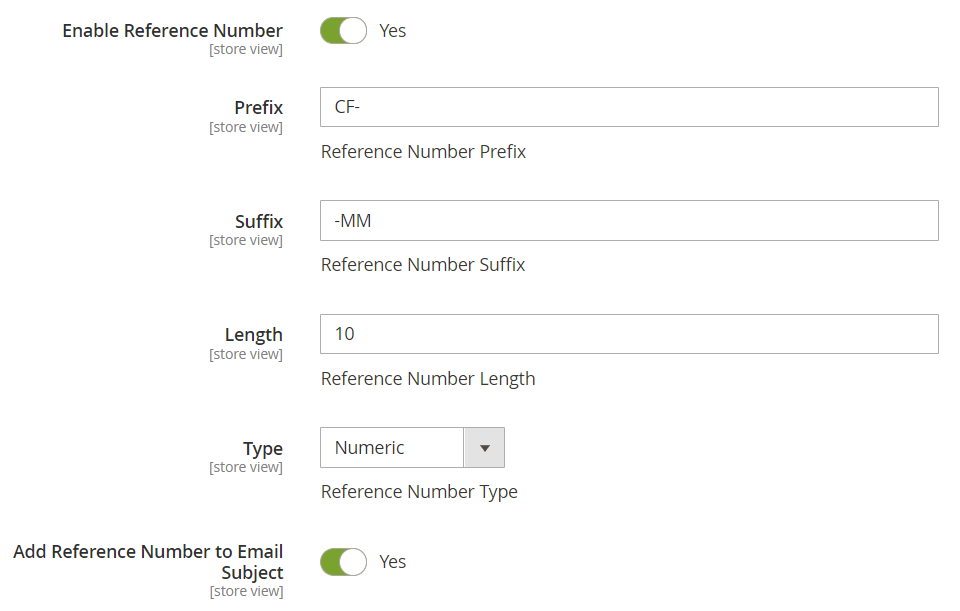
Enable Reference Number
Enable or disable reference numbers in current form.
Prefix
The prefix for the generated reference numbers. For example, if prefix is set to CF- then your reference numbers will look like CF-XXXXXXXXXX.
This doesn't change prefixes of already generated reference numbers.
Suffix
The suffix for the generated reference numbers. For example, if suffix is set to -AZ then your reference numbers will look like XXXXXXXXXX-AZ
This doesn't change suffixes of already generated reference numbers.
Length
The length of the random part of the reference number. The prefix and suffix lengths are not taken into consideration.
Type
The type of the generated random part of the reference number. It can be numeric or alphanumeric.
Add Reference Number to Email Subject
Add reference IDs to the subjects of notification and reply email messages for easy tracking of inquiries.
Reference Number Format Examples
By combining prefix, suffix, type, and length settings, you can create reference numbers tailored to your business needs:
| Prefix | Suffix | Type | Length | Example Output |
|---|---|---|---|---|
SUP- | — | Numeric | 6 | SUP-452352 |
HELP- | — | Alphanumeric | 6 | HELP-A7B9C2 |
ACME- | -001 | Numeric | 5 | ACME-52352-001 |
TICKET- | — | Numeric | 5 | TICKET-00123 |
INQ-2025- | — | Numeric | 4 | INQ-2025-0042 |
RMA- | — | Alphanumeric | 8 | RMA-K4M9N2P7 |
Use Cases
- Customer Support: Assign ticket numbers (e.g.,
SUP-452352) for tracking and referencing support inquiries in communications. - RMA Tracking: Generate unique return merchandise authorization numbers for product return workflows.
- B2B Quote Requests: Provide reference IDs for quote inquiries so customers and sales teams can easily find and discuss specific submissions.
- Warranty Claims: Create trackable claim numbers that customers can use to check the status of their warranty requests.
- Technical Support: Use alphanumeric reference codes for help desk tickets that integrate with external support systems via the REST API.
The Reference Number add-on is available free of charge for all WebForms 3 users with an active support and updates plan. Install via Composer:
composer require mageme/module-webforms-3-reference-number