MageMe EU Withdrawal | Eligibility Rules
This page explains how the module decides whether a customer can withdraw from a given order: the 14-day clock (Art. 9(2)) and the Article 16 exclusion presets. Read this before enabling any of the four preset_* toggles in admin — misconfigured presets unlawfully deny valid withdrawals, which is a separate compliance violation.
For the regulatory context and merchant responsibilities, see Legal & Compliance. For digital content waivers (Art. 16(m)), see Digital Content Waiver.
The 14-day clock
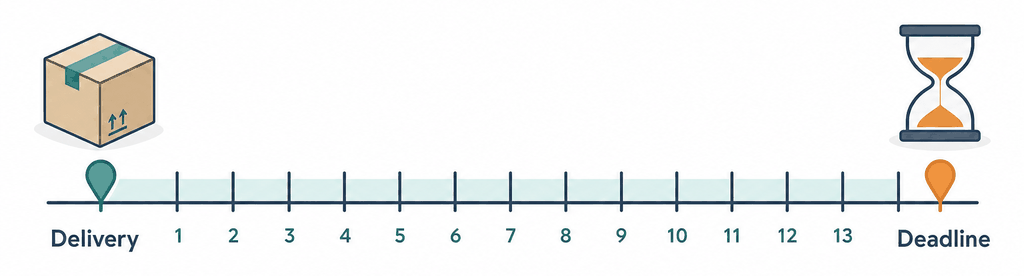
Article 9(2)(b) of Directive 2011/83/EU sets the standard withdrawal period at 14 calendar days from the day the consumer (or a third party other than the carrier indicated by the consumer) takes physical possession of the goods.
How the module anchors the period
The module reads Stores → Configuration → MageMe Extensions → EU Withdrawal → Withdrawal Window → Delivery Confirmation Statuses — a multi-select of Magento order statuses. The anchor is the moment the order first transitions into any of the configured statuses; the period counts from that anchor.
The Magento default workflow uses Complete for fully-shipped orders. Stores that distinguish shipped and delivered (e.g. a carrier-integration status update) should select the status that actually represents physical possession by the customer — not the moment the parcel leaves the warehouse.
For orders with multiple shipments — for example, a backorder split across two boxes a week apart — the Directive specifies the last item delivered as the anchor (Art. 9(2)(b)(ii)). The module's current implementation uses the first transition into a configured delivery status, which matches the standard Magento Complete workflow but may be off for stores with custom per-shipment statuses. If you run split shipments with per-shipment status updates, configure only the final status (the one applied when the last shipment is delivered).
What "eligible" means in the UI
When a logged-in customer visits /withdraw-contract/, every order they own is evaluated:
| State | What the customer sees |
|---|---|
| Anchor in the future | Order not listed (delivery has not happened yet) |
| Within 14 days of anchor | You can return this order until <date> — order is selectable |
| Beyond 14 days | Outside the 14-day period — order is greyed out |
| Items already in an open withdrawal | Already requested per item — quantity available reduced |
| All items already approved or denied | Fully processed — order is greyed out |
The customer always sees why an order or item is ineligible. The same explanation is logged to the audit trail.
Extending the period beyond 14 days
You can configure a period longer than 14 days in Withdrawal Window → Withdrawal Period (Days) (range 14-3650). Common reasons: a customer-trust commitment (30 days, no questions asked), or a national variation that strengthens the floor. Anything shorter than 14 days is illegal under Art. 9(2) and the admin field rejects values below 14.
If you fail to disclose the right of withdrawal to the customer before contract conclusion, Art. 10 extends the period by up to 12 additional months. The free tier does not detect this automatically — Art. 10 detection is a Pro feature (mageme/module-eu-withdrawal-pro).
When the delivery date was never recorded
Some orders are already in a delivery-confirmation status but never recorded when they reached it — typically orders imported or migrated with their status set directly rather than transitioned through Magento. With no anchor date, the 14-day clock cannot be calculated.
Withdrawal Window → If Delivery Is Never Confirmed decides what happens to those orders:
| Choice | Effect |
|---|---|
| Not eligible (default) | The order is not offered for withdrawal — use this when a missing delivery date means you cannot show the period is still open. |
| Keep open | The order stays withdrawable as if delivery has not been confirmed yet — use this only if such orders genuinely still fall inside the window. |
This affects only orders already sitting in a delivery-confirmation status with no recorded transition into it. Orders still waiting for delivery are unaffected.
Excluding specific order statuses
Withdrawal Window → Statuses Excluded From Withdrawal lists order statuses that should never be offered for self-service withdrawal — for example a legacy imported status used only during a data migration. An order whose current status is on this list is left out of the customer's withdrawal list regardless of the 14-day clock.
Do not add a status used by active, deliverable orders — that would withhold a valid withdrawal, which is itself a compliance problem.
Article 16 exclusion presets
Article 16 lists categories of contract that the right of withdrawal does not apply to, with strict conditions. The module ships four preset toggles, each tied to a boolean product attribute. All four presets are off by default — the free tier ships permissive (everything is withdrawable) and the merchant opts items out by enabling the relevant preset and tagging the products that legitimately qualify.
| Preset | Legal basis | Required attribute | Applies when |
|---|---|---|---|
| Custom-Made Goods | Art. 16(c) | is_custom_made = 1 | Product is made to consumer specifications or clearly personalised (engraved jewellery, made-to-measure clothing, configured-to-order furniture). |
| Perishable Goods | Art. 16(d) | is_perishable = 1 | Product can deteriorate or expire rapidly (fresh food, cut flowers, short-shelf-life pharmaceuticals). |
| Sealed Hygiene / Health | Art. 16(e) | is_sealed_hygiene = 1 | Cosmetics, intimate apparel, sealed medical supplies — exclusion applies only if the seal has been broken after delivery. |
| Sealed A/V / Software | Art. 16(i) | is_sealed_av = 1 | Sealed audio, video, or computer-software media — exclusion applies only if the seal has been broken after delivery. Does not cover streaming or digital downloads — use Art. 16(m). |
Toggles live in Stores → Configuration → MageMe Extensions → EU Withdrawal → Eligibility Rules.
Each preset is a denial of a fundamental consumer right. Enabling a preset for products that do not genuinely qualify is itself a violation of the Directive. National regulators (vzbv in DE, ACM in NL, DGCCRF in FR, KKV in FI) actively monitor for over-broad exclusion claims, and class-action exposure (France, action de groupe) follows. Have consumer-law counsel review your catalogue tagging before turning a preset on in production.
Personalised only when the customer asks for it
A product is often only personalised in some orders: a keyring sold plain and, for a few extra euros, engraved. Flagging the whole product as custom-made would take the right of withdrawal away from everyone who bought the plain version, and splitting it into two products splits the stock figure for what is physically one item.
Instead, tick the relevant choices in Options That Make It Custom-Made on the product page, under EU Withdrawal Compliance. The list shows this product's own customisable options: an option that the customer fills in (such as an engraving text) is listed on its own, and an option with a list of answers (such as a drop-down) is listed per answer, so you can tick "Add Engraving" without ticking "No Engraving".
The exclusion then applies only to the order lines where such a choice was actually made and filled in. An empty text field or an untouched option changes nothing, and the same product ordered plain keeps the full 14-day right of withdrawal.
Tick an option only when it makes the item itself made to the customer's specification or clearly personalised. An option that leaves the product unchanged does not qualify, however much it costs.
The ticks only take effect while the Custom-Made Goods preset is enabled; with the preset off, the product page says so under the tick list.
Two practical notes:
- The options have to exist first. The tick list is built from the options already saved on the product, so on a brand-new product the field only appears once the customisable options are saved. Add the options, save, reopen the product, then tick.
- Duplicating a product does not carry the ticks over. A duplicate gets its own copies of the customisable options, so the ticks saved on the original no longer point at anything; the product page says so above the list. Tick the options again on the duplicate and save. The same applies when an option is deleted and created again.
Seal-break semantics for Art. 16(e) and 16(i)
The Directive permits the exclusion only if the seal has been broken after delivery. A sealed, unopened return remains fully eligible for withdrawal.
The free tier flags products with the relevant attribute as excluded in the storefront UI — the customer sees an Excluded under Art. 16(e) reason inline. The merchant verifies the seal-break condition at the return-inspection stage, outside the module. The Pro tier adds a return-inspection workflow to record seal status explicitly per request.
Setting up product attributes
The required attributes are created automatically when the module is installed. The setup patch MageMe\EUWithdrawal\Setup\Patch\Data\AddWithdrawalProductAttributes adds five boolean attributes to all attribute sets, grouped under EU Withdrawal Compliance:
| Attribute code | Frontend label | Used by |
|---|---|---|
is_custom_made | Custom-made / personalised (Art. 16(c)) | Custom-Made preset |
is_perishable | Perishable (Art. 16(d)) | Perishable preset |
is_sealed_hygiene | Sealed hygiene / health (Art. 16(e)) | Sealed Hygiene preset |
is_sealed_av | Sealed A/V / software (Art. 16(i)) | Sealed A/V preset |
is_digital_content | Digital content (Art. 16(m)) | Digital Content Waiver |
A sixth field, Options That Make It Custom-Made (Art. 16(c)), appears in the same group on products that have customisable options — see Personalised only when the customer asks for it.
If the attributes are missing on an existing store, re-run setup:
php bin/magento setup:upgrade
php bin/magento cache:flush
Tagging products individually
- Open Catalog → Products → <product>.
- Scroll to the EU Withdrawal Compliance tab.
- Set the relevant attribute to
Yes. - Save.
Products with variants or components
An order line for a configurable product carries the parent product, with the chosen variant behind it; a bundle line carries the bundle, with its components behind it. The presets check both — the product on the line and the variants or components behind it — so you can tag only the version that qualifies.
That makes a common case easy: sell a keyring as a configurable product with a plain and an engraved variant, tag only the engraved variant as custom-made, and shoppers keep the right of withdrawal on the plain one.
A bundle is returned as a whole, so tagging any single component excludes the whole bundle line.
Tagging products in bulk
For more than a handful of SKUs, use Magento's standard import:
-
Export the products you want to tag: System → Data Transfer → Export with the
Productsentity. Choose CSV. -
In the resulting file, add a column for the attribute (e.g.
is_perishable) and set the value to1for qualifying SKUs. -
Import the updated CSV: System → Data Transfer → Import → Products → Add/Update. Make sure Validation strategy is
Stop on Errorfor the first run. -
Reindex and flush cache:
php bin/magento indexer:reindexphp bin/magento cache:flush
This works for the five Yes/No attributes. Options That Make It Custom-Made is not part of it — its ticks point at a specific product's own options, so they are set on the product page and are neither exported nor accepted by the import.
Filtering tagged products
To audit how many products are tagged with a given attribute, open Catalog → Products, click Filters, and add is_perishable = Yes (or similar). The grid shows the matching SKUs — review the list before enabling the preset in admin.
How the engine combines period and presets
When a customer attempts to withdraw, the eligibility engine (MageMe\EUWithdrawal\Model\EligibilityEngine) evaluates each order item independently. An item is eligible if:
- The order's delivery anchor exists and the current time is within the configured period.
- None of the enabled presets disqualify the item (Art. 16(c)/(d)/(e)/(i)).
- The item is not already part of a non-terminal withdrawal request.
The engine returns one of:
eligible— the item appears in the form with selectable quantity.ineligiblewith a reason code (outside_period,excluded_custom_made,excluded_perishable,excluded_sealed_hygiene,excluded_sealed_av,already_requested,fully_processed,delivery_date_unrecorded,status_excluded,order_canceled).
Orders ruled out by delivery_date_unrecorded (delivered status with no recorded delivery date — see If Delivery Is Never Confirmed), status_excluded (a merchant-excluded status), or order_canceled (the order is in Magento's canceled state) are left out of the customer's list entirely rather than shown greyed-out, because they reflect merchant configuration or order state rather than anything the customer can act on. The reason is still recorded in the eligibility snapshot.
The reason is shown to the customer inline and recorded in the eligibility snapshot stored with the request. The snapshot is what makes the decision auditable later: even if the merchant changes the preset toggles between submission and dispute, the record reflects the rule set that applied at the time of the customer's request.
→ For Article 16(m) digital content — a separate flow with checkout-time waiver and per-locale text — see Digital Content Waiver.