Audit
Part of Pro Version. Seven features come bundled with Pro — this is one of them.
What this does for you
Every single action on every cancellation request gets recorded — automatically and permanently. Who opened the request, who approved it, when the refund went out, when the receipt was sent, when the customer themselves confirmed the cancellation: it's all there, in order, with timestamps.
The records are designed so you can prove later that nothing was edited or deleted after the fact. That's what makes them trustworthy as evidence.
Why it matters
When something goes wrong — a customer says you never refunded them, a regulator asks why a refund took 35 days, a team member insists they approved a request that's still pending — you need a single source of truth. Without a proper log you're trusting people's memory and screenshots from inboxes.
With Audit, the answer is always the same: open the request, switch to the Audit tab, scroll through the timeline. Every who, what and when is there.
What your customer sees
Nothing. Audit is an internal record. The customer's experience doesn't change.
What you see in the admin
On every cancellation request, a new tab called Audit lists every action ever taken on that request:
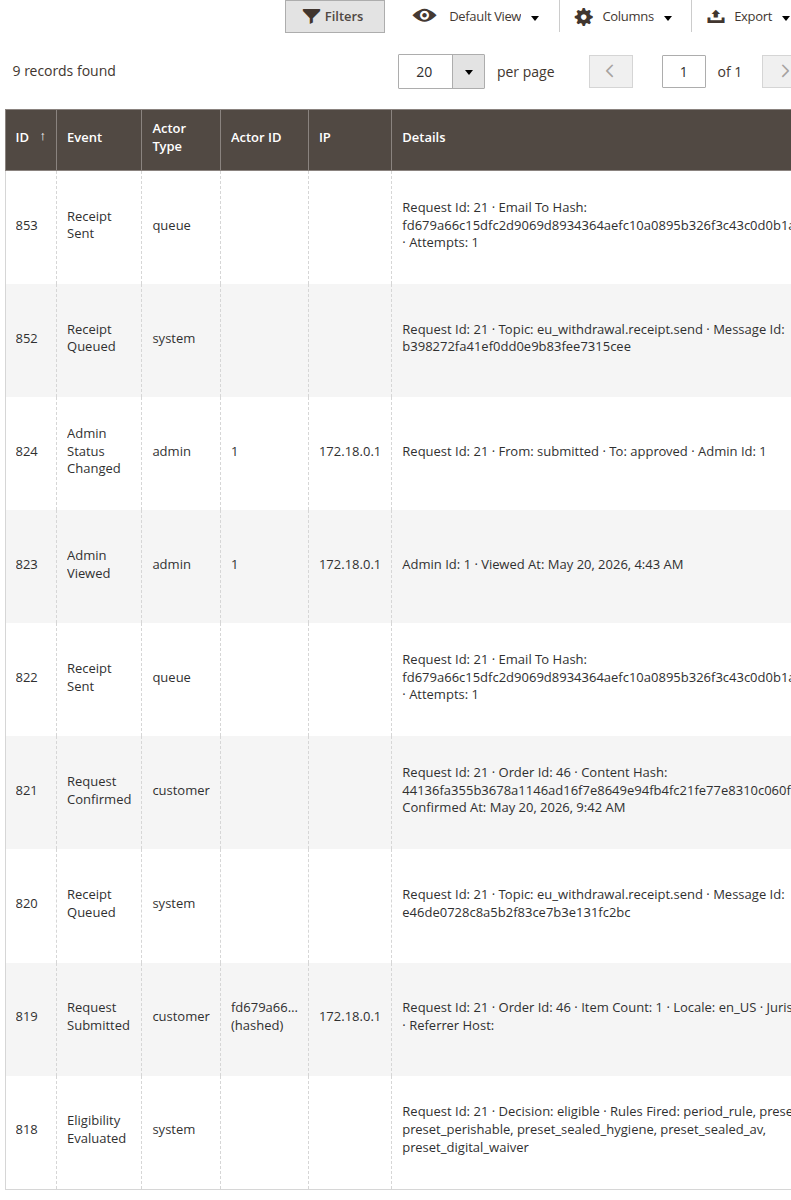
You see, for each event:
- What happened — submitted, approved, denied, receipt sent, refund issued, customer confirmed, etc.
- Who did it — the customer themselves, your admin user, or the system (background jobs and emails)
- When — exact timestamp
- Where — IP address for admin and customer actions
- Details — additional context like "from: submitted to: approved" or which eligibility rules fired
You can filter, sort and export the records — useful when a regulator asks for "everything you have on this request".
What you control in settings
Under Stores → Configuration → MageMe Extensions → EU Withdrawal → Audit Log you'll find four settings:
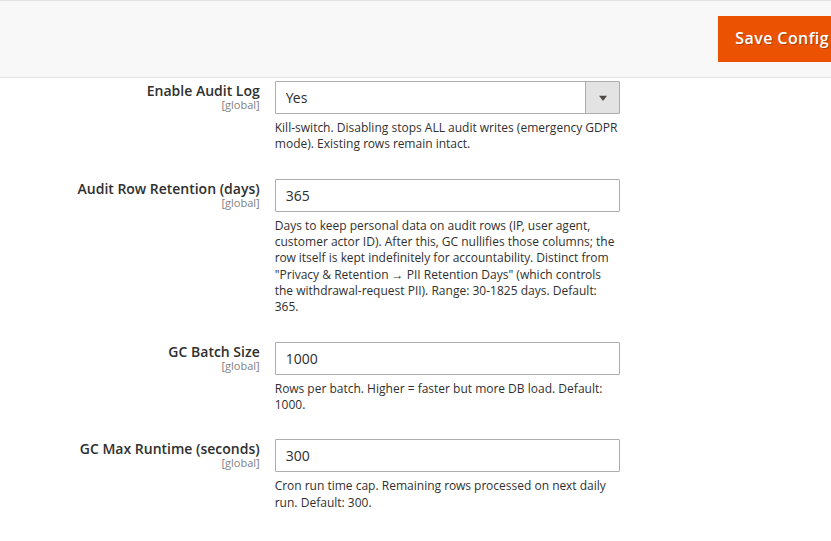
The defaults are tuned for typical EU compliance: records kept for one year, automatic background cleanup, and a kill-switch in case you ever need to stop new records being written (rare).
Settings
| Setting | Default | What it does |
|---|---|---|
| Enable Audit Log | Yes | The master switch. Turn off only if instructed by support or in a data-protection emergency. Existing records stay intact even when turned off — only new writes stop. |
| Audit Row Retention (days) | 365 | How long personal details (IP address, browser info, who the admin was) stay attached to each record. After this window those details are erased; the event itself stays forever. Adjust higher for industries with longer legal retention, lower if you want stricter privacy. Range: 30 to 1825 days. |
| GC Batch Size | 1000 | How many old records get cleaned up at once by the daily background job. Most stores never change this. |
| GC Max Runtime (seconds) | 300 | Time limit for the daily cleanup job. Anything left over runs the next day. Most stores never change this. |
When you'd use this
- Multiple people on your team handle cancellations
- You ever need to demonstrate due diligence — "this request was reviewed, here's the trail"
- You're under any kind of audit or compliance program (ISO, SOC 2, GDPR)
- Disputes about timing matter — "when exactly did we send the refund?"
When the free version is enough
- You're a single-person shop
- Disputes are rare and your inbox is enough of a record
- No external audit, no regulator pressure, low cancellation volume
Need help?
Write to support@mageme.com if you'd like advice on the right retention window for your industry, or if you need help running a verification of your audit records ahead of an external review.