MageMe EU Withdrawal | Setup Checklist
After installing the module, work through this checklist before enabling it in production. Each item links to the page with full detail. The module is disabled by default — leave it off until every applicable item is done.
1. Pick the delivery anchor
The 14-day withdrawal clock starts when an order transitions into a configured delivery status. This is the only mandatory field.
Where: Stores → Configuration → MageMe Extensions → EU Withdrawal → Withdrawal Window → Delivery Confirmation Statuses.
For a standard Magento workflow, select Complete. If you use custom statuses (delivered, delivered_partial), select the status applied at the moment of physical possession by the customer. The withdrawal period length (default 14 days) lives in the same group as Withdrawal Period (Days).
→ Full mechanics: Eligibility Rules → The 14-day clock.
2. Decide which Article 16 exclusions apply
Article 16 lists categories that can be excluded from the right of withdrawal. All four presets are off by default and you opt in only for categories that legitimately qualify in your catalogue.
| Preset | Required attribute | Apply to |
|---|---|---|
| Custom-Made (Art. 16(c)) | is_custom_made = Yes | Engraved jewellery, made-to-measure clothing, configured-to-order furniture |
| Perishable (Art. 16(d)) | is_perishable = Yes | Fresh food, cut flowers, short-shelf-life pharmaceuticals |
| Sealed Hygiene (Art. 16(e)) | is_sealed_hygiene = Yes | Cosmetics, intimate apparel, sealed medical supplies (only if seal broken) |
| Sealed A/V/Software (Art. 16(i)) | is_sealed_av = Yes | Sealed CDs, DVDs, packaged software (only if seal broken) |
Where: Stores → Configuration → MageMe Extensions → EU Withdrawal → Eligibility Rules.
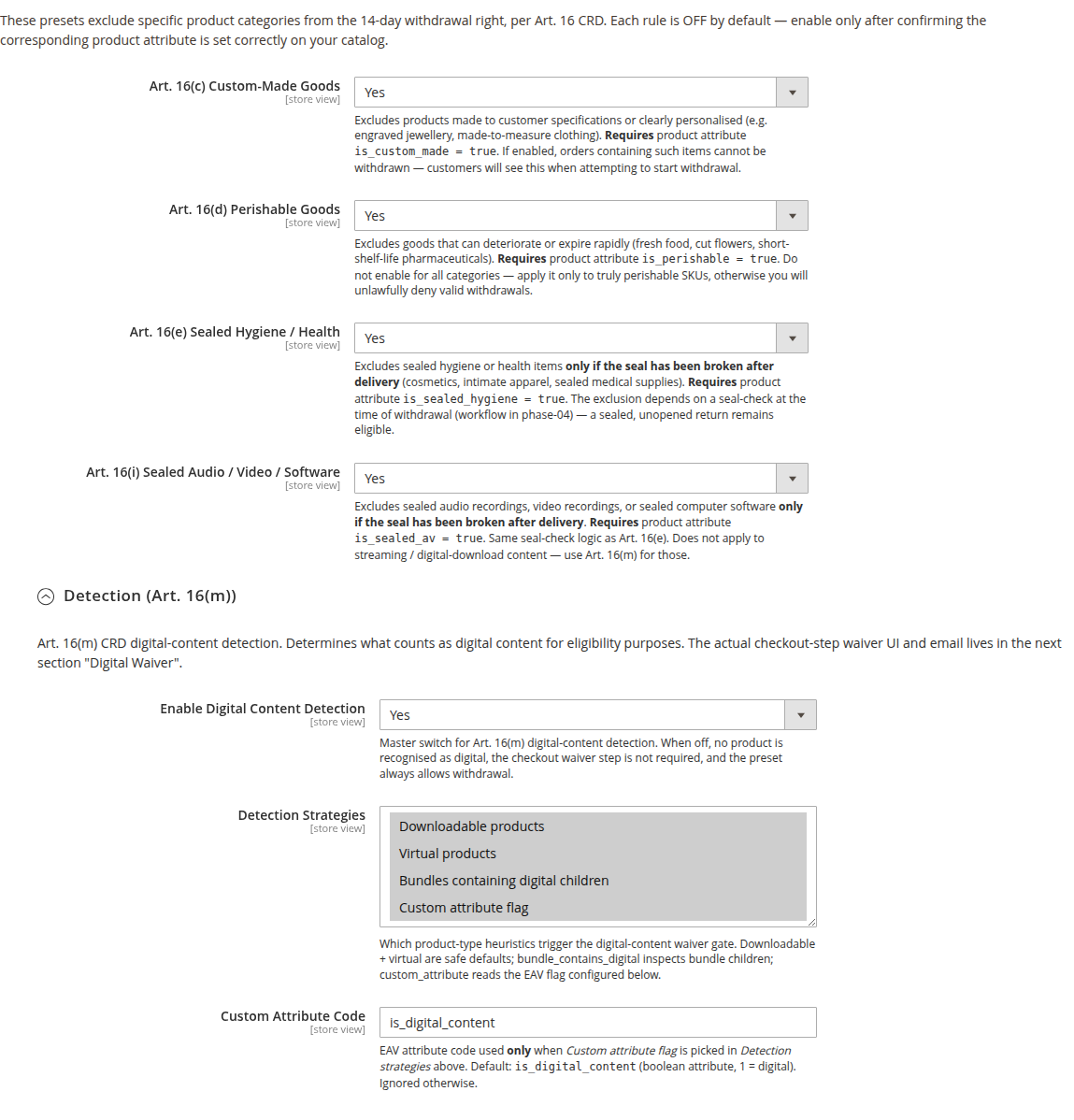
The required boolean product attributes are created automatically when the module installs. Enabling a preset alone changes nothing — you must also tag the qualifying products (next step).
→ Detail and seal-break workflow: Eligibility Rules.
3. Tag your products
For each preset you turned on in step 2, tag the qualifying products with the matching attribute.
Single product:
Catalog → Products → <product> → EU Withdrawal Compliance tab → set the relevant attribute to Yes → Save.
Bulk:
- System → Data Transfer → Export → Entity
Products→ CSV. - Add a column for each attribute (e.g.
is_perishable) and set1for the qualifying SKUs. - System → Data Transfer → Import →
Products→Add/Update. - Run
php bin/magento indexer:reindex && php bin/magento cache:flush.
Tagging products that do not legitimately qualify is itself a compliance violation. Have consumer-law counsel review borderline categories before applying a preset to them.
4. Configure digital content (only if you sell it)
Skip this section if your catalogue has no downloadable, virtual, or other digital products.
If you do sell digital content:
- Enable Detection —
Stores → Configuration → MageMe Extensions → EU Withdrawal → Eligibility Rules → Detection (Art. 16(m)) → Enable Digital Content Detection. - Pick detection strategies —
Downloadable+Virtualis the safe default. AddBundles containing digital childrenif you sell mixed bundles, orCustom attribute flagif your digital products are simple-type SKUs. - Enable Checkout Waiver Step —
Stores → Configuration → MageMe Extensions → EU Withdrawal → Digital Waiver (Art. 16(m)) → Enable Checkout Waiver Step. Required for Article 16(m) to apply. - (Optional) Set a BCC Merchant address under Digital Waiver → Confirmation Email for audit-trail archiving.
The waiver step renders only when a detected digital product is in the cart. Without it, no Art. 16(m) exclusion applies.
→ Detail: Digital Content Waiver.
5. Verify button labels and pre-contract block
Two settings are legally critical and have counsel-default values you should normally leave alone:
- Step 1 Button Label — default
Withdraw from contract here(Art. 11a(2) verbatim). - Step 2 Button Label (Confirmation) — default
Confirm withdrawal.
Where: Stores → Configuration → MageMe Extensions → EU Withdrawal → Frontend → Buttons.
Override only with written legal advice from counsel in the target jurisdiction.
The Pre-Contract Information block is on by default and renders on the checkout payment step. Confirm:
- Withdrawal Period (Days) in Withdrawal Window matches your T&C disclosure (default 14; extensions to 30/100 are common).
- Return Address in Pre-Contract Information is set (or falls back to your Magento store contact address).
→ Detail: Configuration → Pre-Contract Information.
6. Translate Annex I disclosure (only if defaults aren't suitable)
Skip this section unless you operate in a Member State whose national transposition mandates wording the bundled translation does not cover (notably Germany §356a BGB, France L.221-28, Netherlands post-Bol.com).
The Annex I disclosure text lives in 22 per-locale XML files. To override, copy the bundled file into your theme and edit there — the resolver reads theme overrides before module bundles.
→ Detail: Annex I Translations.
7. Customise customer emails (optional)
The module ships seven email types and a shared branding wrapper. Defaults are functional out of the box.
If you want to brand the emails:
- Set the USP Strip items and Social Links under
Stores → Configuration → MageMe Extensions → EU Withdrawal → Customer Notifications → Branding. - Confirm your store name, logo, support email, and store address are populated under
Stores → Configuration → GeneralandContent → Design → Configuration → Transactional Emails— the branding wrapper reads them from there.
To customise wording:
- Marketing → Communications → Email Templates → Add New Template → load one of the seven defaults → edit → save.
- Assign your custom template in
Stores → Configuration → MageMe Extensions → EU Withdrawal → Customer Notifications → \<email\> → Email Template.
→ Detail: Email Templates.
8. Data retention (nothing to configure)
The free tier has no retention settings. Withdrawal records are kept until you remove them through your own GDPR data-retention process — there is no automated anonymisation or deletion job in this release. Hold them for the EU consumer-rights statute of limitations (1–3 years depending on Member State, up to 6 years for commercial records) before deleting. Configurable retention of the forensic trail is part of the Pro Audit add-on.
→ Detail: Configuration → Data retention.
9. Hyvä theme storefront
If your storefront is on Hyvä, install the companion module — see Hyvä Theme Compatibility. On Luma storefronts the base module already covers everything.
10. Going live — final checks
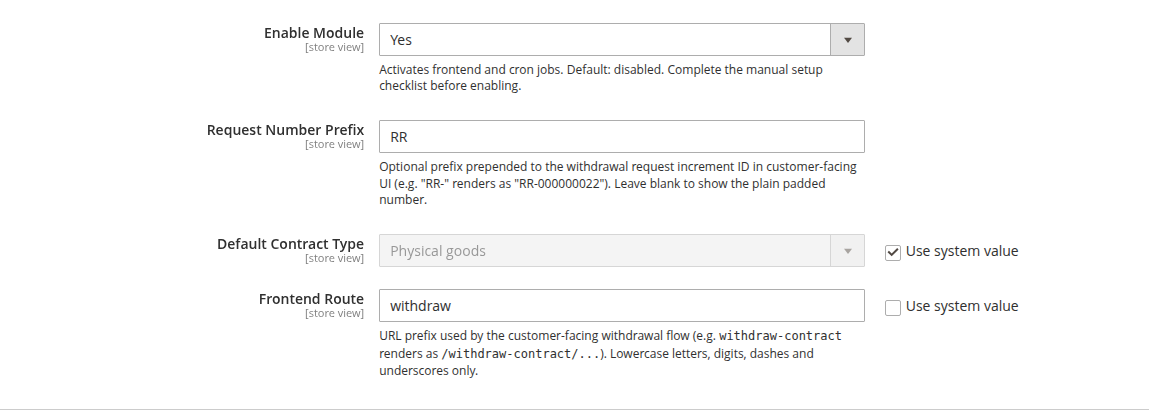
Before flipping Enable Module to Yes:
- Test the customer flow end-to-end against a delivered order: place an order → mark
Complete→ walk through/withdraw-contract/→ confirm the receipt email arrives at a real inbox (not just Mailpit/MailHog). - Inspect the receipt email's SPF / DKIM / DMARC alignment on your production SMTP. An undeliverable receipt invalidates compliance under Art. 11a(4).
- Verify the Stores → Configuration → MageMe Extensions → EU Withdrawal → General → Frontend Route value is the one you want — changing it after launch breaks URLs already printed in shipment emails.
- Read Legal & Compliance — particularly T&C updates and the AS-IS disclaimer.
- Magento cron is running (
* * * * * php /var/www/html/bin/magento cron:run). The module's retry runner ticks every minute.
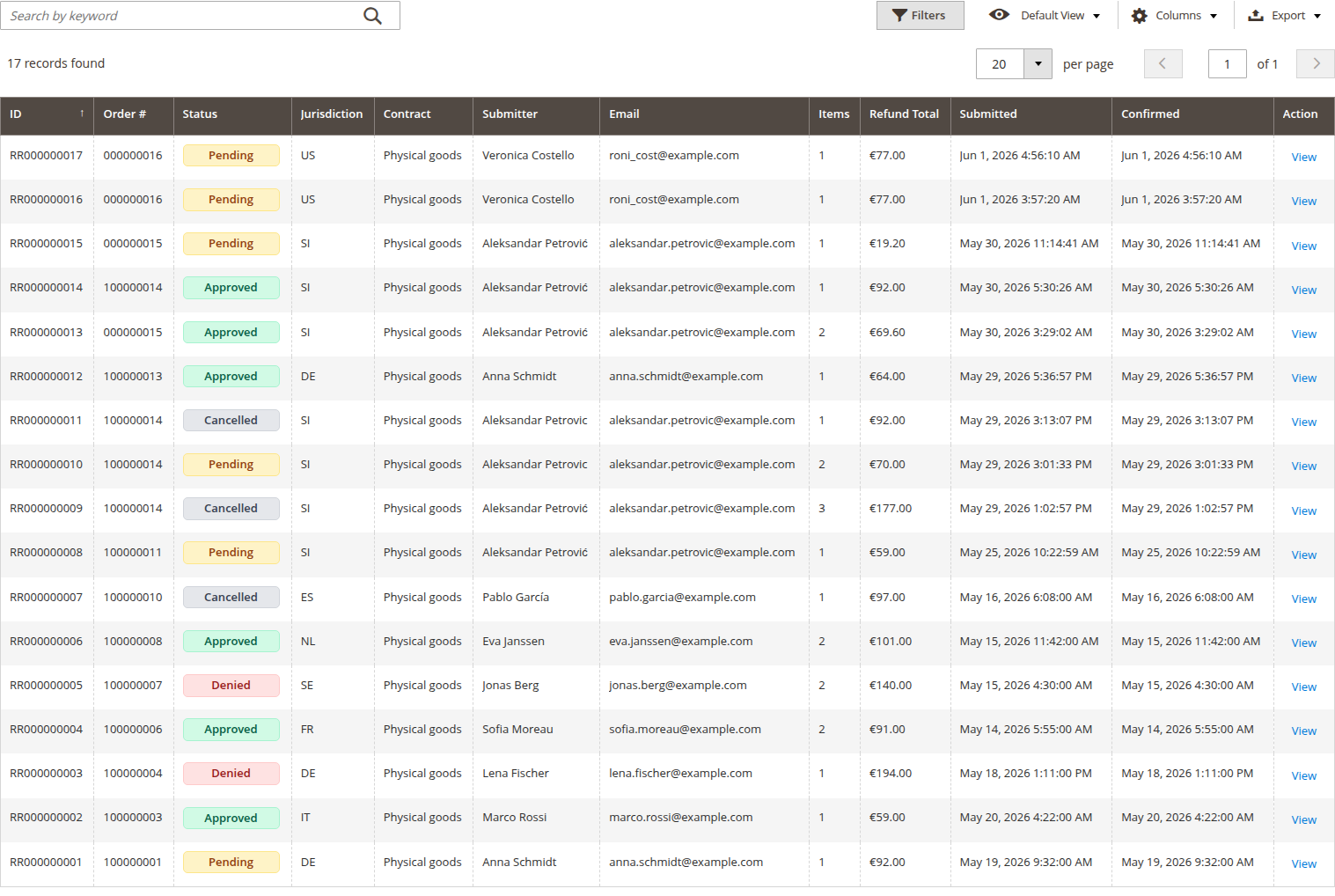
Enable the module, flush cache, and ship it. When customer requests arrive, you'll see them in Sales → Withdrawals → Withdrawal Requests:
php bin/magento cache:flush