MageMe EU Withdrawal | Email Templates and Branding
This page covers every email the module sends, how to customise the templates, the shared branding settings, retry mechanics for the legally-required receipt, and the opt-in withdrawal-CTA variants of Magento's order and shipment emails.
For the regulatory background on the receipt and waiver-confirmation emails (Art. 11a(4)), see Legal & Compliance. For per-locale waiver text overrides, see Digital Content Waiver.
Customer-facing emails
The module sends seven emails to customers and one admin alert. Six of the customer emails are configured under Customer Notifications; the seventh — the digital-waiver confirmation — sits with the rest of the digital-waiver settings.
Six lifecycle emails
Configured under Stores → Configuration → MageMe Extensions → EU Withdrawal → Customer Notifications.
| # | When the customer receives it | |
|---|---|---|
| 1 | Submission Confirmation | Right after they confirm the withdrawal on the storefront |
| 2 | Approval | When you approve their request in admin |
| 3 | Denial | When you deny their request in admin |
| 4 | Cancellation (Admin-Initiated) | When you cancel on their behalf |
| 5 | Cancellation (Customer Self-Cancel) | When they cancel their own pending request |
| 6 | Receipt — Durable Medium | Immediately after they confirm — this is the legally-required proof under Art. 11a(4) |
Digital-waiver confirmation email
Configured under Stores → Configuration → MageMe Extensions → EU Withdrawal → Digital Waiver (Art. 16(m)) → Confirmation Email (Art. 11a(4)). Lives next to the other digital-waiver settings so all waiver configuration sits together.
| When the customer receives it | |
|---|---|
| Digital Waiver Confirmation | Right after they place an order containing a digital item — required by Art. 11a(4) to make the Art. 16(m) waiver effective |
The Receipt email and the Digital Waiver Confirmation email are the durable-medium proofs required by Article 11a(4). The on/off toggle in admin only stops the sender — the records are still generated and stored. Disabling either is a compliance violation unless you deliver the durable medium through another counsel-reviewed channel.
Customising a template
Magento's standard email-template workflow applies — there is nothing module-specific about it.
-
Navigate to Marketing → Communications → Email Templates.
-
Click Add New Template.
-
Load default template — choose the one matching the email you want to change (e.g.
MageMe EU Withdrawal — Receipt). -
Edit the subject, content, and CSS.
-
Save.
-
Assign your custom template in the matching admin field — either Stores → Configuration → MageMe Extensions → EU Withdrawal → Customer Notifications → <email> → Email Template (lifecycle emails) or Stores → Configuration → MageMe Extensions → EU Withdrawal → Digital Waiver (Art. 16(m)) → Confirmation Email → Email Template (waiver email).
-
Flush cache:
php bin/magento cache:flush
The next email of that type uses your custom template.
Available variables
When you load a default template, the @vars block at the top lists every placeholder Magento will substitute when sending — customer name, order number, refund total, withdrawal number, view URL, and the shared branded header and footer. Keep the variable names exactly as shown in the loaded template; rename them and Magento renders the placeholder verbatim.
The returned-items table is one of those placeholders, and it is built for you. When the customer withdraws a bundle that goes back as a single item, the table lists what is inside it underneath the bundle, each part with its quantity, so the customer packs the whole set. You do not need to change anything in the template for that to appear.
The action button in the status emails (submission, approval, refund-initiated, and customer self-cancellation) is guest-aware. Registered customers are taken to their order page; guests — who have no account — are sent to the withdrawal lookup page instead, so the link works without a login. With the Pro Magic Link add-on installed, guests get a one-click link straight into their request. The button's wording follows suit: a customer who lands on their own page sees a "view" label, while a guest sent to the lookup page sees Find your order, so the button never promises a page the reader cannot open.
BCC the merchant
The BCC Merchant field on each email group accepts one address (or a comma-separated list). Every send of that email type blind-copies the address — useful for compliance archives or for putting customer-service in the loop. Leave blank to skip.
Receipt and DLQ
The receipt email (Email #6) is the legally-required durable-medium proof under Art. 11a(4). It is the only email with retry and dead-letter-queue mechanics.
| Setting | Default | What it does |
|---|---|---|
| Delivery Retry Attempts | 3 | How many times the module retries a failed send before giving up. Range: 1–10. |
| DLQ Alert Recipient | (blank, falls back to your General Contact email) | Address that receives the alert when retries are exhausted. |
The module retries failed receipt sends automatically — a cron job runs every minute and reattempts delivery. After the configured number of retries, the alert email goes to the address above, the request remains valid, and the Resend receipt button on the request detail page lets you trigger one more attempt once you've fixed the underlying issue (SMTP, recipient mailbox, etc.).
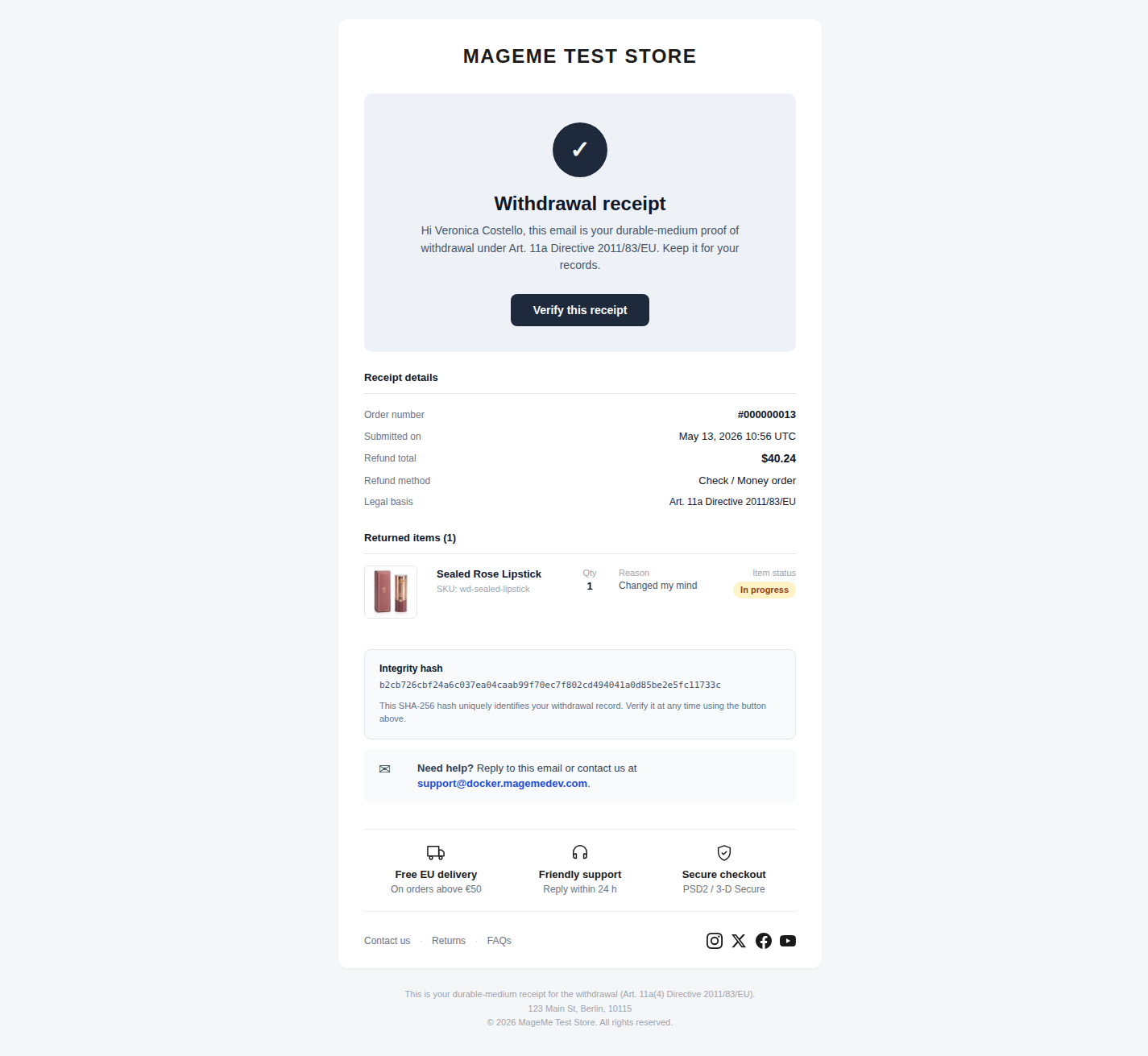
A successfully delivered receipt looks like this in the customer's inbox:
Magento cron
Make sure Magento's standard cron is running on your server:
* * * * * php /var/www/html/bin/magento cron:run
Without it, retries, abandoned-request cleanup, and other background jobs do not fire.
Email branding
All seven customer-facing emails (six lifecycle + waiver confirmation) share a branding wrapper rendered into email_header_html and email_footer_html. Configure under Stores → Configuration → MageMe Extensions → EU Withdrawal → Customer Notifications → Branding.
Store identity (read from Magento)
The following fields are not module settings — the branding wrapper reads them from the standard Magento configuration:
| What | Where Magento reads it from |
|---|---|
| Brand wordmark / name | Stores → Configuration → General → General → Store Information → Store Name |
| Logo | Content → Design → Configuration → <store> → Transactional Emails → Logo Image |
| Support email | Stores → Configuration → General → Store Email Addresses → Customer Support → Sender Email |
| Store address | Stores → Configuration → General → General → Store Information → Store Contact Address |
Get these right in Magento and they propagate to every EU Withdrawal email automatically. No module configuration needed.
USP strip (3 slots)
Three optional "USP" rows render above the email body — common uses are Free delivery / EU orders above €50, Return for free / Within 14 days, Secure checkout / SSL encrypted. For each slot:
| Field | Purpose |
|---|---|
| Icon | Picks an SVG icon from the module-bundled icon set (truck, return, shield, lock, etc.) |
| Title | Short header line (e.g. Free delivery) |
| Subtitle | Supporting line (e.g. EU orders above €50) |
Empty title and subtitle hide the slot.
Social links
Four optional social URLs render as round monogram badges in the email footer:
| Field | Renders if |
|---|---|
| Instagram URL | URL is set |
| X / Twitter URL | URL is set |
| Facebook URL | URL is set |
| YouTube URL | URL is set |
Leave blank to hide the badge.
Footer links
The footer's small text links render only when they have somewhere to go:
| Link | Renders if |
|---|---|
| Contact us | Contact Page URL is filled in — or, when it is blank, a Customer Support sender email is set (the link then opens an email to that address) |
| Returns | Returns Page URL is filled in |
| FAQs | FAQ Page URL is filled in |
Point Contact Page URL at your contact form or helpdesk, Returns Page URL at your returns information page (the withdrawal page itself is a good choice) and FAQ Page URL at your help or FAQ page. Each URL must be a full address including https://. Leave a field blank and that link simply doesn't appear — nothing in the footer ever points at a placeholder.
Contact Page URL reaches further than the footer: the "Need help?" panel and every "Contact support" link and button inside the emails follow it too. With a contact page configured they open it; without one they offer an email to your support address instead.
Add a withdrawal CTA to order and shipment emails
The module ships four alternate versions of Magento's standard order-confirmation and shipment-notification emails. Each adds a "Start withdrawal" call-to-action with the deadline, on top of the regular email content. The shipment variants are the most useful placement — the 14-day clock starts at delivery, so the customer sees the CTA in the same email that tells them their parcel has shipped.
To turn this on:
- Go to Stores → Configuration → Sales → Sales Emails.
- In the Order (and/or Shipment) section, open the template dropdown and pick the matching
MageMe EU Withdrawal — … (with withdrawal link)option — the four variants now appear in the dropdown directly, with nothing to set up first. - Save Config.
Want to change the wording first? Clone a variant under Marketing → Communications → Email Templates → Add New Template (load the MageMe variant, edit, Save), then pick your saved copy under Sales Emails instead.
Troubleshooting
| Symptom | What to check |
|---|---|
| Customer says they did not receive the receipt | Open the request in admin → check the audit log for delivery attempts and any error message → click Resend receipt after fixing the underlying SMTP / mailbox issue. |
| Custom template is set in admin but emails use the default | Flush cache (php bin/magento cache:flush), then trigger a test email. |
| Branding header is blank | The wrapper reads store name, logo, support email, and address from your standard Magento config — make sure those are populated for the active store view. |
| Receipt arrives without the "Verify this receipt" button | That button is a Pro feature. The free-tier template hides it automatically when the verify URL is not available. |
| The sales / shipment email shows Magento's default content with no withdrawal row | Confirm the template you assigned under Sales Emails is one of the MageMe variants from the table above — Magento's own default templates do not include the row. |