Evidence
Part of Pro Version. Seven features come bundled with Pro — this is one of them.
What this does for you
For any cancellation request, you can download a single file that contains everything — the cancellation terms the customer was shown at checkout, the request they submitted, the receipt they got, and the full action history. Send that one file to a lawyer, a regulator, or your insurance company. They have the whole story without you having to assemble it.
The file is digitally signed by your store. The recipient can verify on their own computer — no special tools, no logging into your store — that the file came from you and hasn't been edited.
Why it matters
When a real dispute happens, the worst part is often not the dispute itself — it's spending half a day hunting through emails, admin screens, order histories and inboxes to gather what you need to defend yourself. Then having to explain to the recipient that the screenshots you sent are all from your own admin and they have to trust you.
Evidence Package replaces that whole exercise with a single click. One file, signed, complete, verifiable independently. Everything a regulator needs, packaged the way they expect to receive it.
What your customer sees
Nothing. Evidence Package is an internal tool for you, used only when a dispute or audit comes up.
What you see in the admin
On every cancellation request, you'll find an Export evidence pack link in the request summary:
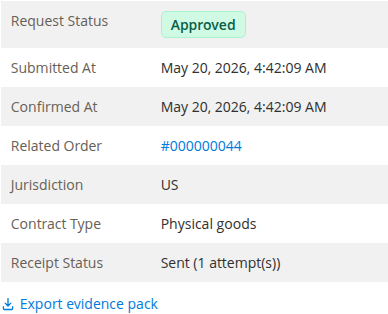
One click downloads a zip file. Inside, you'll find:
- The cancellation terms shown to the customer at checkout (only present if you also have Annex I)
- The full cancellation request the customer submitted, with reasons and items
- The signed receipt that was sent to the customer
- The complete action log from the Audit feature (only present if Audit was running at the time)
- A short README explaining what's in the package and how to verify the signature
- A small standalone verification tool
The recipient can open the verification tool on any computer, point it at the package, and instantly see whether the package is genuine and unaltered.
What you control in settings
Under Stores → Configuration → MageMe Extensions → EU Withdrawal → Evidence there's a digital signing key that gets generated for you automatically the first time you install the Pro Version:

You don't need to do anything with these — they're set up for you. The fingerprint (the long string) is the public proof of your store's identity. You can publish it on your website ("our evidence packages are signed with this fingerprint") if you want recipients to verify the package came from you specifically.
Settings
| Setting | What it does |
|---|---|
| Signing Key | Your store's private signing key. Auto-generated on install — you should never need to change this. If you do, all packages exported before the change will be marked as signed by a different key. |
| Public Key Fingerprint | The matching public identifier. Safe to share publicly. Lets a recipient confirm that the package was signed by your store and nobody else. |
When you'd use this
- A customer disputes a cancellation and you need to give a lawyer everything
- A regulator opens a case and asks for "the full file" on a specific transaction
- An insurance claim or chargeback needs documentary proof of what happened
- An internal investigation — your accounting team wants to see the whole picture
When the free version is enough
- You've never had to assemble evidence for an outside party
- Your typical disputes resolve by replying to the customer
- You don't operate in a jurisdiction where regulators ask for full packages
Need help?
Write to support@mageme.com if you'd like to walk through what's in an example evidence package, or if you need help publishing your store's fingerprint on your website to make verification easier for recipients.