Magic Link
Part of Pro Version. Seven features come bundled with Pro — this is one of them.
What this does for you
Every order confirmation and shipment email gets a single Withdraw from contract here button that takes the customer straight to the cancellation form — already filled in with their order. No order number lookup, no email confirmation, no captcha.
The friction between "I want to cancel" and "I've cancelled" drops from a minute to a click.
Why it matters
The most common reason customers contact your support about cancellations is "I can't find my order number". That single ticket costs you more in support time than a typical refund saves you in lost goods. With Magic Link, the customer never has to look anything up — the link in their email is the start of the cancellation flow.
Fewer support tickets, faster resolutions, and a much friendlier first impression for anyone who needs to cancel.
What your customer sees
In every order confirmation and shipment email, a short Right of withdrawal section now ends with a clear blue button:
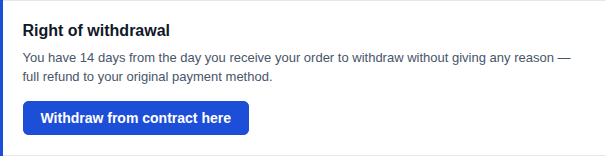
Clicking the button opens your store's cancellation form with the order already identified — the customer just picks which items to return, confirms, and they're done.
If the customer doesn't have Magic Link (free version), the same section sends them to a lookup form where they have to type their order number and email address. Magic Link skips that step.
What you see in the admin
Two settings under Stores → Configuration → MageMe Extensions → EU Withdrawal → Magic Link:
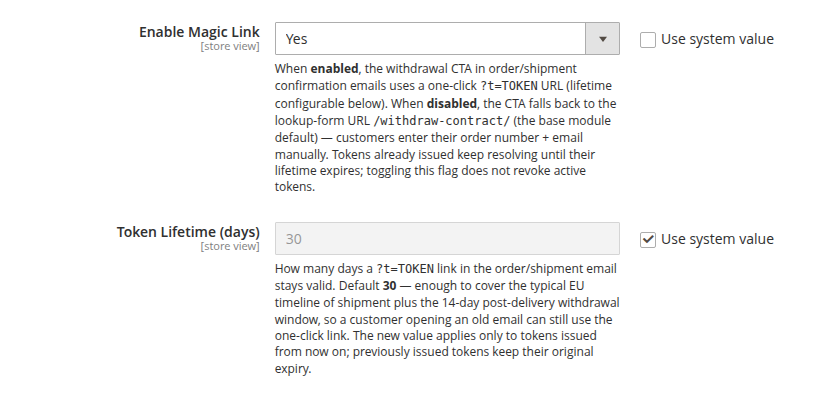
That's it. Both settings have sensible defaults — out of the box, Magic Link is on and links stay valid for 30 days.
Settings
| Setting | Default | What it does |
|---|---|---|
| Enable Magic Link | Yes | When on, every order and shipment email includes the one-click cancel button. Turn off if you want customers to go through the lookup form instead. |
| Token Lifetime (days) | 30 | How long each cancel link in an email stays clickable. 30 days covers a typical shipping window plus the 14-day cancellation period. Lower it for tighter security; raise it if customers commonly open old emails. |
Turning Magic Link off does not invalidate links already sent — they keep working until they expire. Changing the lifetime affects only new emails sent after the change.
When you'd use this
- You want fewer support tickets about cancellations
- Your audience is less technical and gets confused by lookup forms
- Reducing checkout-to-resolution friction matters for your brand
- You've seen drop-off in the cancellation flow at the lookup step
When the free version is enough
- You receive almost no cancellation requests and the lookup form has never been a problem
- You sell to a primarily B2B audience that's comfortable with order numbers
- You prefer the extra friction of the lookup form as a soft barrier against accidental cancellations
Need help?
Write to support@mageme.com if you'd like advice on the right token lifetime for your store, or if you want to test the magic link flow before announcing it to your customers.